How to Build a WebMCP Tool: A Technical GEO Guide
AI Summary
Quentin Yacoub explains how to build a WebMCP tool, an emerging technical GEO optimization that lets personal AI agents like OpenAI Dots, Meta Muse or Grok Bot use a site's features directly instead of clicking. He maps use cases by complexity, then shows how he built a news search tool with Claude Code, tested it with Gemini and tracks every agent call.

Table of Contents
Cet article est aussi disponible en français : Comment créer un outil WebMCP : guide GEO technique
Personal AI agents like Grok Bot, Meta Muse and OpenAI Dots now browse websites and act on behalf of their users. For SEO and GEO specialists, this raises a new question: how do we make our sites easier for them to use? I answer it in How to Optimize Your Website for Personal AI Agents; this article focuses on one of the answers.
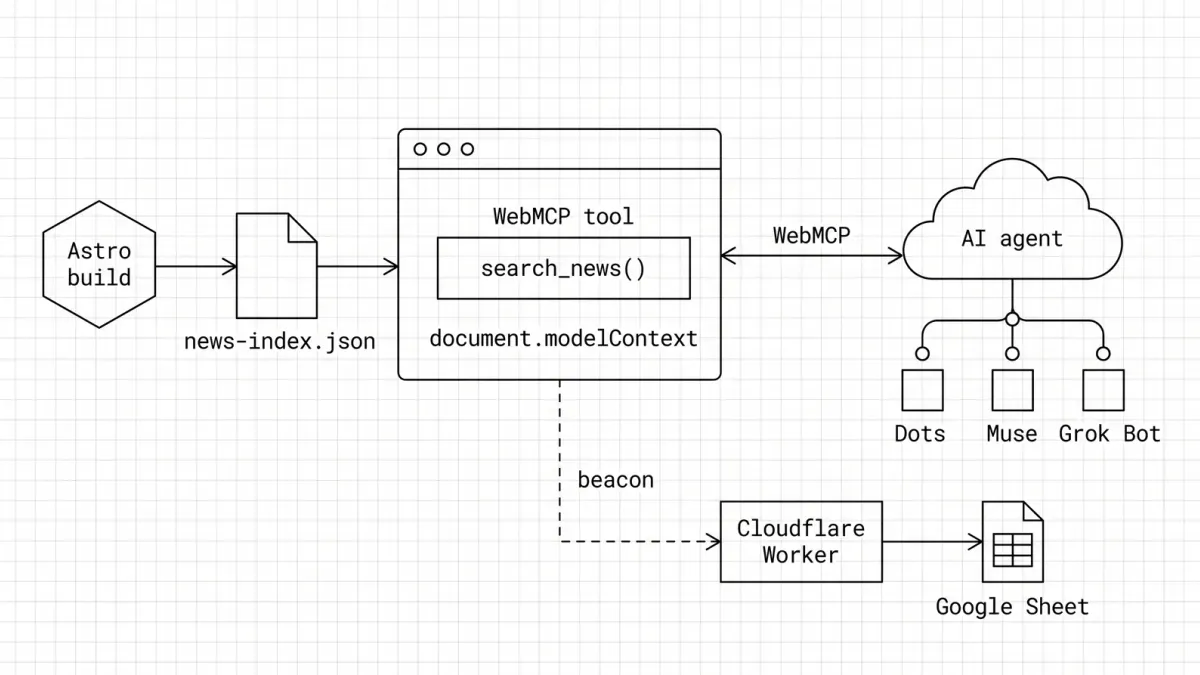
One solution is to install WebMCP tools, a technical GEO optimization that lets agents use a website’s features directly, instead of clicking through pages. I built one on my blog with Claude Code, in one morning: search_news, which lets an agent search my SEO, GEO & AI news and get back each news item with its summary, source, date and my analysis.
Here is what WebMCP is, how I built mine, what my first tests with Gemini taught me, and how I track every agent call.
Note: this article gets technical in places. If you just want the takeaways, click here to have ChatGPT summarize it for you without the jargon.
What Is WebMCP?
WebMCP is a proposed web standard, incubated in the W3C Web Machine Learning Community Group, that lets a page expose tools to the AI agent using the browser.
Without WebMCP, an agent that wants to search my news has to load the page, find the right filter, click, scroll and read the result, often from screenshots. With WebMCP, the page tells the agent: “I have a search_news tool, here are its parameters”. The agent calls it like a function and gets clean, structured data back. Your interface becomes an API, without building an API.
How to Declare a WebMCP Tool
There are two ways to declare a tool, depending on how your page works:
| API | How it works | Best for |
|---|---|---|
| Declarative | A few extra attributes on an existing HTML <form> | Simple forms: contact, newsletter, search |
| Imperative | A few lines of JavaScript (document.modelContext.registerTool) | Anything dynamic: search with filters, multi-step flows |
Which Browsers Support WebMCP?
As of October 2026, WebMCP only works in Chromium-based browsers and agents:
| Browser or agent | Status |
|---|---|
| Chrome | Public origin trial from Chrome 149 to 162, until March 29, 2027 |
| ChatGPT desktop app | Its built-in browser supports WebMCP since August 25, 2026 |
| Edge | Implementation ready for testing |
| Firefox | Mozilla took a neutral position |
| Safari | WebKit formally opposed the proposal |
WebMCP Use Cases by Complexity
Not every WebMCP tool is as simple as mine. The effort depends on two things: whether the tool only reads data or changes something, and whether it needs a logged-in user.
| Use case | Example tool | Type | Complexity |
|---|---|---|---|
| Content search (blog, news, docs) | search_news(query) | Read-only | Low |
| Lead or contact form | request_quote(name, email, need) | Light action | Low |
| Product search and filters | search_products(query, size, maxPrice) | Read-only | Medium |
| Availability check (stock, slots, rooms) | check_availability(date, guests) | Read-only | Medium |
| Add to cart or wishlist | add_to_cart(productId, quantity) | Action | Medium |
| Booking or reservation | book_table(date, time, guests) | Consequential action | High |
| Account actions (SaaS, customer area) | create_report(type, period) | Action, logged-in user | High |
| Checkout and payment | checkout(cartId) | Consequential action | Very high |
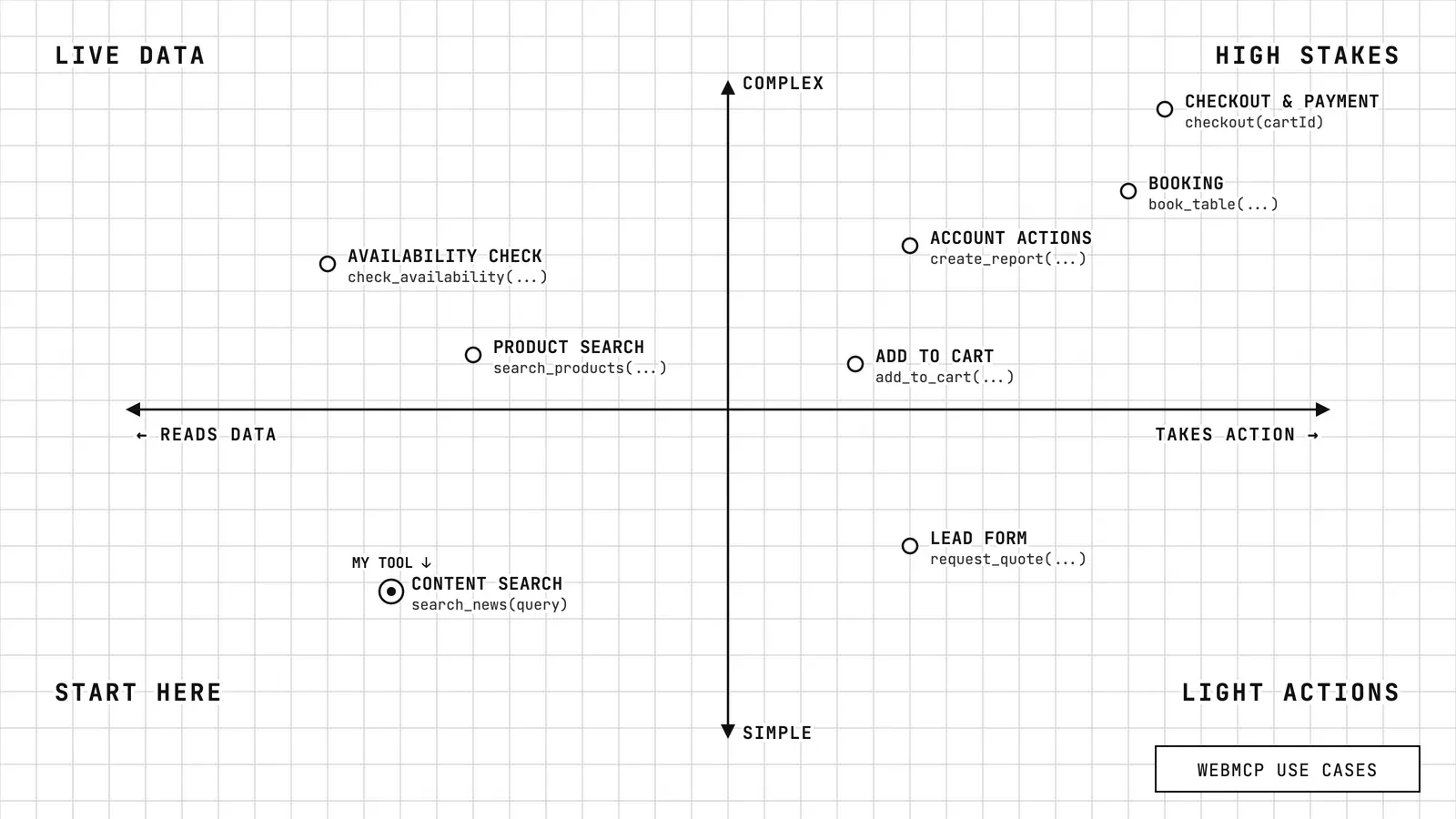
What makes a tool more complex:
- Real-time data: a static file is enough for content, but stock, prices and availability need your live APIs.
- A logged-in user: cart, bookings and account actions depend on the user’s session and permissions.
- Consequential actions: anything that books, buys or sends must be flagged
consequentialHint: trueand keep a confirmation step for the human. - Payment: usually handed back to the user, or covered by a dedicated protocol like UCP or ACP.
The good news: most sites already call these functions from their interface. A WebMCP tool can plug into the same APIs instead of making the agent click through the UI. My advice is to start with a read-only tool on your most useful search or filter, measure how agents use it, then move to actions with confirmation steps.
The Test I Set Up
Honestly, my site does not need WebMCP. It is a blog: there is no cart, no booking, no account, not even a contact form. WebMCP makes much more sense for action-heavy sites, like e-commerce, travel booking, SaaS dashboards or complex forms, where an agent can save dozens of clicks and avoid costly mistakes.
For any site, accessibility comes first, because browser agents navigate a site the way a human does (I explain why in my article on personal AI agents), and a WebMCP tool is a bonus on top, not a replacement. So I added it to research and learn, with three questions in mind:
- How hard is it to implement on a static site?
- Do agents actually pick the tool on their own, and use the data correctly?
- Can I measure when an agent uses it?
I chose the most useful action on my site: searching my SEO, GEO & AI news, exactly the kind of content a personal agent would fetch for a morning recap. I built everything with Claude Code, from the first prompt to the deployment, in one morning. As with the rest of this site, I describe what I want, review the plan and the code, and test.
The Steps to Build a WebMCP Tool
Here is the overview before the details:
- Build a JSON index of all news items at build time
- Register a
search_newstool in the browser - Load the tool on every page
- Get a Chrome origin trial token so every Chrome visitor sees it
- Test it locally with Chrome’s inspector and Gemini
- List the news index and the tool in
llms.txtand the OKF bundle - Track every call AI agents make to my WebMCP tool
- Test it with personal AI agents like Meta Muse
Step 1: Build a JSON index of the news
My news items are stored in the frontmatter of each digest edition: title, category, summary, source and my take on why it matters. A small Astro file gathers them into a single file, regenerated at every build: /news-index.json.
It is a static file, served from the Cloudflare cache like an image. No server, no database. And it is useful in itself: any agent or script can read it, WebMCP or not.
Not on Astro? Any build script, CMS export or API endpoint can generate the same JSON file.
Step 2: Register the tool
This is the heart of my WebMCP tool. The script describes the tool to the agent: its name, what it does, and which parameters it accepts.
document.modelContext.registerTool({
  name: 'search_news',
  description:
    "Search Quentin Yacoub's bilingual SEO, GEO & AI News digest. " +
    "`expertTake` is Quentin Yacoub's personal analysis: " +
    'attribute it to him when quoting it.',
  inputSchema: {
    type: 'object',
    properties: {
      query: { type: 'string', description: 'Keywords, e.g. "AI Overviews"' },
      lang: { type: 'string', enum: ['en', 'fr'] },
      category: { type: 'string', enum: ['SEO', 'GEO', 'LLM Ads', 'Tools'] },
      since: { type: 'string', description: 'Date, YYYY-MM-DD' },
    },
  },
  annotations: { readOnlyHint: true },
  execute: (args) => searchNews(args),
});
Three things worth noting for a non-developer:
- The description is written for a model. It is the equivalent of a meta description, except the reader is an AI deciding whether to call your tool. Be explicit.
readOnlyHint: truetells the agent the tool changes nothing, so it can call it without asking its user. A tool that books or buys something should be flaggedconsequentialHint: trueinstead.- The script does nothing in browsers that do not support WebMCP. Human visitors see no difference, and Core Web Vitals are not affected.
Step 3: Load it on every page
In Astro, adding the script to the main layout is enough: it is bundled and loaded on every page automatically. On WordPress or any other CMS, add it to your theme’s footer or through a tag manager.
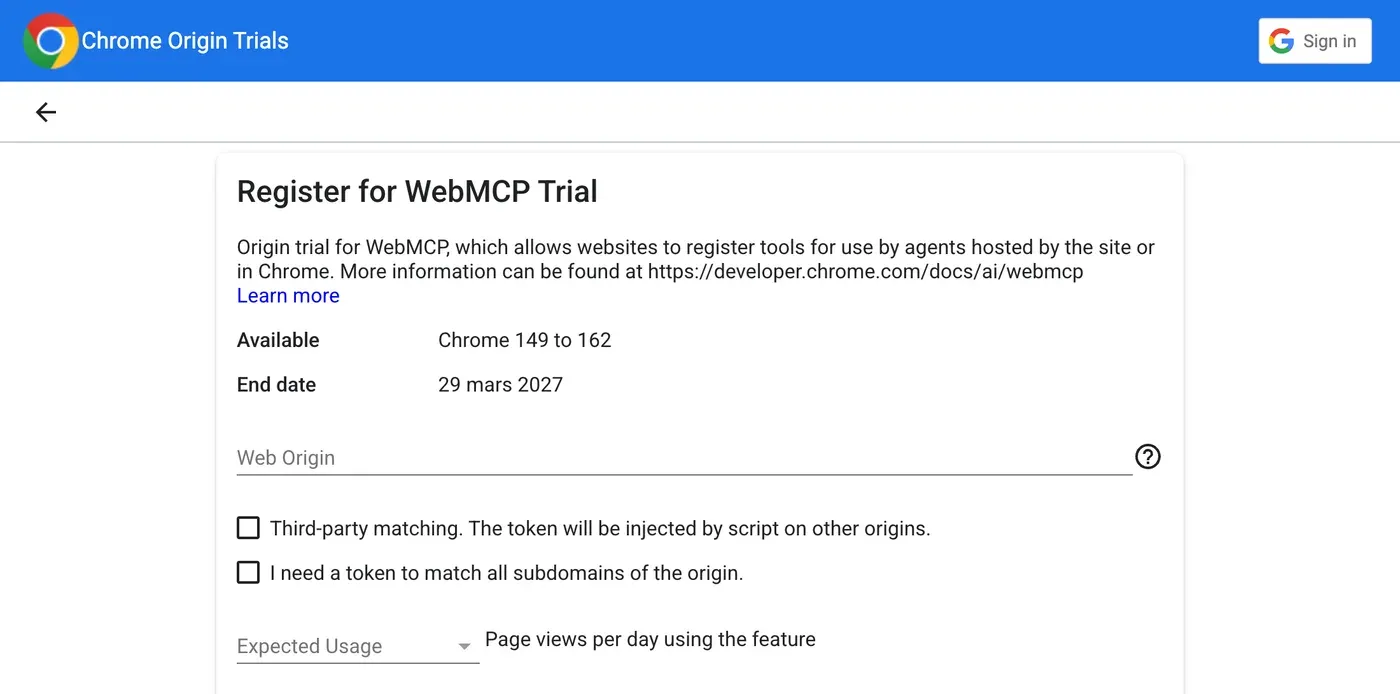
Step 4: Get a Chrome origin trial token
The origin trial token turns WebMCP on for every visitor using Chrome 149 or later, without any setting on their side.
Origin trials are how Google tests experimental features on real sites before deciding to ship them. Go to the Chrome Origin Trials page, search for WebMCP, register your domain, get a token, and add it to a <meta> tag in your pages. It took five minutes. The token is public by design and only works on your domain.
Step 5: Test it with Gemini
You do not need the token to test. The Chrome flag (chrome://flags/#enable-webmcp-testing) turns WebMCP on in your browser only, which is enough to try the tool locally before going live.
Chrome’s team also built an extension, the Model Context Tool Inspector, that lists the tools on a page, runs them, and lets Gemini use them from a plain English question. This is where I learned the most (more on that below).
Step 6: List it in llms.txt and the OKF bundle
A WebMCP tool is discovered by the browser when it loads the page, so it does not need to be declared anywhere else. But an agent can also start its journey on my site with these files, so I added an “Agent resources” section to my llms.txt and to my OKF bundle, pointing to /news-index.json and mentioning the search_news tool. Agents that read these files can find the full news index directly, with or without WebMCP.
Step 7: Track every agent call
A WebMCP call happens inside the visitor’s browser, so it never shows up in your server logs. To see it, each call to my tool sends a small beacon to a Cloudflare Worker, which logs it in a Google Sheet, and an event to Matomo, my analytics tool. I explain the full setup in how to track the agents that use WebMCP below.
Step 8: Test it with personal AI agents
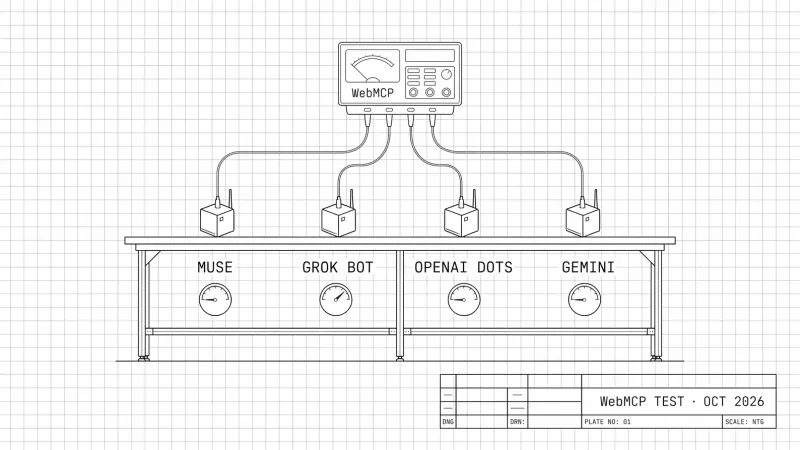
Gemini in the inspector is a lab test. The real test is a personal AI agent like Meta Muse, OpenAI Dots or Grok Bot browsing your live site. You can ask it directly to use your tool, for example:
Go to quentinyacoub.com and use the search_news WebMCP tool to find the latest news about Adobe.Then check your tracking (step 7): if the call worked, a new /__webmcp row appears in the Google Sheet and a WebMCP event in Matomo. I ran this test with Meta Muse, Grok, ChatGPT and Gemini, and I will publish the results in a few days. Update: the article is live: Do Personal AI Agents Use WebMCP? (October 2026 Benchmark)
What I Have Learned So Far
These two lessons come from my tests in Chrome’s Model Context Tool Inspector (step 5), where Gemini can call the tool directly. In the regular Gemini app, the results were different. I will share them in a few days, along with my tests of other AI agents. Update: the article is live: Do Personal AI Agents Use WebMCP? (October 2026 Benchmark)
Lesson 1: Agents Erase Your Name
I asked Gemini for the latest news about ChatGPT ads. It picked my tool on its own and found the right item. But my analysis, which starts with “I see this as a clear signal…”, came back as “This development is a clear signal…”. My opinion became an anonymous fact.
For GEO, that is exactly what we do not want. I renamed the field to expertTake, added my name on every item, and asked the agent in the description to attribute it. Next test: “Quentin Yacoub notes that…”. Attribution is something you can engineer.
Lesson 2: Tell Agents How Fresh Your Data Is
I asked for GEO news published since September 1. My latest published edition is from June (a short summer break), so there was nothing to find, but Gemini did not know that and made seven calls with different filters before giving up. One extra field in the response, latestAvailable (the date of the most recent item), fixed it.
The takeaway: anything that is implicit for a human reader (who wrote this, how recent it is) has to be explicit for an agent.
How to Track the Agents That Use WebMCP
This is the part I find the most interesting, and it is not that easy to implement. A WebMCP call happens inside the visitor’s browser. It never appears as a request in your server logs, and analytics tools do not see it by default either.
I built a small tracking system:
- Every time the tool is called, the page sends a tiny, invisible message (a “beacon”) to a dedicated address on my site, with the tool name, the search query and the number of results.
- A Cloudflare Worker (a small script running on Cloudflare’s network, in front of my site) catches that message, answers immediately without bothering my server, and adds a row to a Google Sheet with the date, the query, the user agent and the country.
- Matomo, my analytics tool, also receives an event for each call, with the tool name, the query and the number of results. WebMCP calls show up in my analytics reports, next to regular visits. With GA4 or Adobe Analytics, a custom event does the same.
- The same Worker also logs every page loaded by an agent that signs its requests with Web Bot Auth, even when its user agent looks like a normal Chrome browser, as well as pages loaded by automated browsers like
HeadlessChrome.

The logic is simple: a user agent no longer tells you much, but a tool call does. In practice, no human visitor calls search_news, so every row is an agent (or me, testing). To see whether real agents call it, I ran a test with four AI assistants. I will publish the results in a few days. Update: the article is live: Do Personal AI Agents Use WebMCP? (October 2026 Benchmark)
The Pros and Cons of WebMCP Today
The Pros of Implementing WebMCP
| Benefit | Why it matters |
|---|---|
| Cheap to add | For a read-only tool like mine: one script, one data file, one meta tag. No server, no plugin. |
| Faster and cheaper for agents | One function call instead of dozens of screenshots and clicks. In nekuda’s WindTunnel benchmark, WebMCP setups solved every task with a 2.5 to 7.5 times faster median execution and a 3 to 47 times lower median cost. |
| You control the narrative | You decide what the agent receives, including attribution and freshness. |
| Measurable | Every call can be logged, even from agents that hide their identity. |
The Cons of Implementing WebMCP
| Drawback | The reality |
|---|---|
| Chromium only | Safari opposes it and Firefox is neutral. |
| Experimental | The API already changed once in 2026 and could change again. |
| Token expiry | The origin trial ends March 29, 2027. You will need to renew it or remove it. |
| Limited adoption | No public data yet on how often agents call WebMCP tools. |
| One protocol among many | WebMCP competes with UCP, ACP, PAP, MCP servers and others. Nobody knows yet which ones agents will really use. |
| A big project for complex tools | A read-only search is quick, but carts, bookings or account actions need live APIs, user sessions, confirmations and security reviews. |
What’s Next?
WebMCP works, but do agents actually use it? I tested it with four AI assistants, and I will publish the results in a few days. Update: the article is live: Do Personal AI Agents Use WebMCP? (October 2026 Benchmark)
In the meantime, WebMCP is worth a pilot, not a priority. If you run an e-commerce site or a booking flow, test it. If you run a content site, start with the basics (accessibility, markdown versions of your pages, an llms.txt file), then add WebMCP on top.
To go further at the scale of a brand, Adobe, where I work, offers two complementary tools: Brand Visibility tracks AI agent traffic on your site, and Sites Optimizer detects the accessibility issues that make agents fail.
To zoom out, read How to Optimize Your Website for Personal AI Agents: how to optimize your website for them beyond WebMCP, what I call PAO (Personal Agent Optimization), and why accessibility is still the safest bet.
If you are testing WebMCP or other agent protocols on your own site, let’s compare notes. Or if you have any questions, feel free to reach out to me on LinkedIn.
Please note: All opinions and blog posts shared on this website are strictly my own personal projects. They do not represent the views, strategies, or official products of my employer, Adobe.

Hi, I'm Quentin, an SEO/GEO Specialist at Adobe building AI powered tools for Site Optimizer and Brand Visibility. I use this site to document my thoughts on where search is heading in the age of AI, and to share the strategies and shortcuts I rely on.
Connect on LinkedInRelated Articles
Do Personal AI Agents Use WebMCP? (October 2026 Benchmark)
October 2026 benchmark: four personal AI agents, my WebMCP news tool, a car booking and a form. Which agents used WebMCP, how fast, and what my logs saw.

ChatGPT Query Fan-Out Bookmarklet v2 (GPT-5.6)
A free bookmarklet that records ChatGPT's hidden fan-out queries live, now that GPT-5.6 no longer saves them in the conversation.

ChatGPT 5.3/5.4 Query Fan Out Extraction Bookmarklet
Get a free bookmarklet to extract the hidden search queries and citations ChatGPT uses to build its answers.
My SEO/GEO Technical Stack: Architecture and Results
Go behind the scenes of an SEO/GEO-first blog architecture. Discover how Astro, Cursor, and Cloudflare deliver perfect Core Web Vitals and peak crawlability for LLMs

Hello World: My First Website
Welcome to my personal blog. Discover why I built this sandbox to document my experiments in SEO, GEO, and AI-driven search. Here's what to expect.